Beck

Upload Custom Fonts to Canva

Upload Custom Fonts to Canva

Let’s talk about Canva!

I don’t use Canva much…or at all…because I’m a total Adobe girl. (It’s basically necessary for me to create my fonts & SVG designs.) But if I wasn’t a designer, I’d totally be using Canva.

In short, Canva is a browser-based graphic design program that makes it easy for users to create their own designs. Canva comes stocked with various items — fonts, graphics, stock images — and it also allows you to upload your own items, as well, to create your designs!

One question that I get frequently is whether or not a Canva user can upload their own fonts.

The short answer is yes!

There are a few caveats, though. This feature is not available for free Canva account users. It is, however, available to Canva Pro, Canva for Enterprise, Canva for Education, and Canva for Nonprofit users. A user can also upload only up to 100 fonts. (If you’ve maxed that out, which is easy to do, you can remove some of your uploaded fonts to make a swap.)

Canva: Upload Font How-To

I created a video to show you how to upload a custom font to Canva! If you aren’t certain about whether or not a pro account is right for you, you can sign up for a free trial, which is what I did here in order to show you how to upload a font!

Here’s a breakdown of the instructions for a Canva Pro account:

  1. After you log in to your Canva account, click “Brand Kit” from the panel off to the side.
  2. Click “Upload a Font” which is found under the Brand Fonts section. You’re able to use multiple font file types: .otf, .ttf, or .woff formats are accepted!
  3. Navigate to the font you wish to upload, and click “Open.” You’ll be prompted to confirm that you’re licensed to use the font in this manner. (If you purchase my fonts, you’re allowed to upload the fonts to your Canva Pro account for your use only, whether personal use or commercial use!)
  4. Click upload after confirming!
  5. You’ll receive a message that lets you know if the upload was successful or not.
  6. That’s it! It’s so easy to upload fonts to Canva!

How to Access Your Uploaded Fonts

You’ll be able to find your uploaded fonts whenever you access the dropdown menu where the fonts are located. All custom fonts are found at the very top of the list, under the Uploaded Fonts section! I think it’s really nice and helpful that the uploaded fonts are separated from Canva’s font library.

Once you select one of the custom fonts, you’ll be able to type in it and create an awesome design!

Upload Custom Fonts to Canva Read More ยป

The Fall Font Bundle

So many things come to mind when you think of fall, like apple cider, apple butter, maybe a pumpkin patch, crisp autumn leaves, or a special fall occasion. Fall is my favorite season of all, and ironically, I’ve only ever lived in places that don’t get much in the way of foliage or cooler temps – hello Florida & Southern California! That doesn’t stop me from lighting my cinnamon candles in August, though, wishful thinking that maybe, just maybe, there will be a nip in the air.

While we’re on the topic, my love for the season has given rise to a few fall-themed (or named) fonts! The Fall Font Bundle has the perfect fonts for your every mood, project, and products like home decor, DIY decorations, party invitations, shirts, anything you could think of.

If you’re looking for my bundle that includes fonts for fall, you can check it out by clicking the button below! If you’re here checkin’ out what this bundle is all about, read on!

As a graphic designer, I have a collection of fonts (over 7,000!!!!), like holiday fonts, script fonts, calligraphy fonts, anything you could think of, there’s so many ways to use them. (Even free fonts too!)

Most of the fonts that are included in the Fall Font Bundle are script fonts or handwriting fonts, but I’ve also included a super cute sans font, too!

Buying Fonts in a Bundle is a Way Better Value

Before purchasing, you should ask yourself “What am I looking for in a font bundle?”

For me, it’s always variety and value! For starters, you get seven fonts in this bundle, but you’re only paying for about 1.5 fonts. This bundle is valued at $84, but you’re paying only $18.

So, what do you get in this collection of fonts for fall?

As far as variety goes… this bundle might be a bit script font-heavy, but there are a few cute sans fonts which work well with the other fonts included in the bundle! Take Pumpkin Chunk for example – it’s a super cute sans serif font, and it pairs perfectly with Gingersnap Script and Hey Pumpkin Script!

Autumn Love also comes with a sans serif font, already paired perfectly.

Butternut is an adorable handwriting font, and Fall Ember is a beautiful script font that would look lovely on a wedding invitation.

Overall, the fall font collection is perfect for fall crafting projects, too! Each font features a smooth edge, making it an easy option for your Cricut or Silhouette cutting machine. These fall fonts are sure to make your design projects look a bit more special for the fall season.

As a heads up, making this bundle an even cooler value, I include commercial use licensing as a standard. That means that you can use the fonts for a personal project, or you can use them for your commercial projects or business offerings!

Let me tell you a bit about each font in the Fall Fonts Bundle!
Autumn Love is a font duo, and this script font is packed with excellent features. It’s probably one of my favorite fall fonts that I’ve ever created, because I adore the heart details included on the letters. As you can see, you can add hearts as a part of the swash options, between words, or even dotting your i!
Butternut Script is a monoline handwriting font. It reminds me a bit of writing with a gel pen, with a consistent size throughout. The letters are bouncy and flowy, I love that you could use this font for things like shirt designs or logos.
Gingersnap is playful script font. It’s also bouncy like Butternut, but features more of a messy signature style vibe.

Pumpkin Chunk is a sans font, and is all-caps. It makes quite the bold statement, making it easy to read from afar. It would look great on a shirt!

Septiembre is a modern calligraphy font featuring loopy flowing letters. It has a very casual feel.
Fall Ember is also a modern calligraphy font, but it is much thinner and leans a bit more to the right. Fall Ember is refined, but still maintains an effortless handwriting feel. There are plenty of alternates included in this font, so you can swap letters at will to give your project a bit more of a handwritten, unique look!

Hey Pumpkin is a simple monoline script, and I love this font for shirts and crafting! I also think that it’s perfect for making graphics for social media – these quotes are super cute!

How Can I Use These Fonts?

I’ve already mentioned a few possible uses above, but I think this font collection is so versatile!

We’ve already touched on craft projects – most of those will make use of a Cricut machine or something similar so that you can make a t shirt, coffee mugs, signs, cupcake toppers, greeting cards, and so much more! All of these things can be made for you personally, gifted to a friend (perfect for the holidays!), or you can sell it because I include commercial use with my fonts!

Another great use would be on your website (or a client’s website). I love to see my fonts used as accents on a website, or used as a heading element on blog posts or web pages. Even though this collection of fonts has a fall theme, your website doesn’t necessarily need to be fall-themed to make great use of the fonts!

Wedding invitations was something I mentioned above, specifically with the Fall Ember font, but any of the script fonts would be a good fit – it simply depends on what aesthetic you hope your wedding invitation will have! Are you hoping for something casual but fun? Hey Pumpkin would be great for that! If you’re looking for something a little more romantic but easy to read, Autumn Love would be a great fit – I mean, it already has cute little decorative heart details, which definitely fits the wedding theme!

The Best Font Bundle on My Website

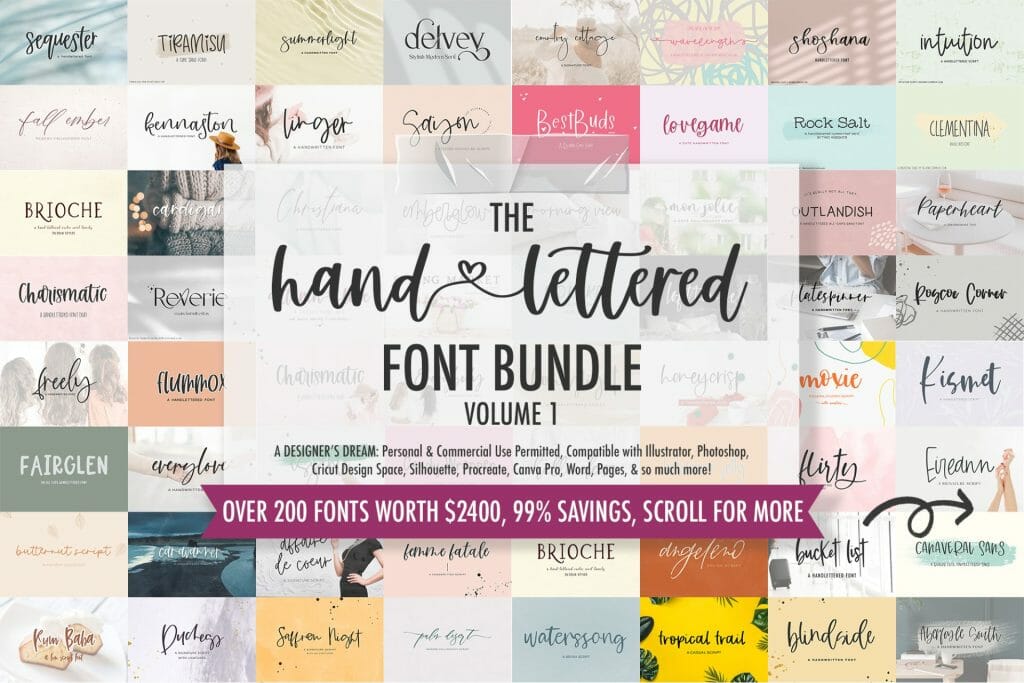
If you’re a total sucker for font bundles like I am, don’t limit yourself to my Fall Font Bundle! All of these fall fonts, plus over 200 more, are available with my Handlettered Font Bundle.

It’s truly a special bundle because the value is out of this world, and the variety is insane! (Remember, I told you that I looked for value and variety…this is it, y’all, if you’re in business and needing a great deal to overhaul your font list.)

This is one of those collections that will entirely change how you design, and will probably give you a bunch of new ideas for products, projects, and combinations.

The Fall Font Bundle Read More ยป

Use a Cursive Font for Cricut Designs

Script fonts always look amazing on a screen, and even better in print or in designs. I’m a font designer, so I realize that I might be a little picky and critical about font choice for any given design project. That said…the default fonts in Cricut Design Space aren’t really all that cool. (No shade at the original designers, because I know how much work goes into creating the fonts! All I’m saying is … there are WAY more choices than the defaults!)

Using a script font while crafting may also prove to be challenging at first because there are so many choices to choose from, but this post is filled with tons of information to get you started! Working with mugs, canvas, stationery, and many more craft projects will be as easy as pie!

Script Fonts in Cricut Design Space

When getting used to using script fonts in Cricut Design Space, it’s impossible to choose just one font that has all of the script letters exactly the way you want them. Cricut Design Space does this really weird thing where the letter spacing is always, always off. Meaning, it treats the font completely differently than the designer intended it to, and for those fancy script fonts where it’s supposed to look like continuous cursive writing…it just looks like spaced out cursive letters. Womp womp. It’s terrible, and I don’t know why Design Space does this, but it’s fixable!

(I have a blog post about this, but here’s the run down: use the letter spacing tool and bring it as close together as possible. Sometimes, it’s actually negative, and not just 0. This will give you a pretty good indication of whether or not it’s a font that you want to use. If you do, choose the “ungroup to letters” option up at the top of the layers panel. This releases each letter to its own layer, and you can piece them together yourself. Make sure to weld the letters to each other before cutting them!)

Anyway, my Handlettered Font Bundle has over 200 hand-lettered fonts to chose from. With this many amazing fonts in one package, it’s hard to go wrong! You may be thinking, “200+ fonts? That’s too many! How will I ever find the one that fits well with the project I’ve envisioned?” Don’t worry! The bundle is easy to navigate, and all fonts included are shown in photos, along with its very own branding. (I’m convinced each font has its own personality.) This way, it is easier for people to scroll through the fonts included, and see how they look visually before crafting with them!

What projects would use script fonts?

Using script fonts for projects always gives the craft the extra edge; it puts it over the top, and it always looks way more polished. I’ve done many Cricut machine projects, but there are some that are super popular within the Cricut and crafting communities. Within Design Space, you can create some amazing works of art, like customized mugs, t-shirts, and farmhouse signs. If you have access to professional design programs like Adobe Illustrator, you can also use the fonts for logos, branding, product packaging, and other branded materials.

The font collection is very versatile, and contains a wide variety of cursive fonts, all handlettered to perfection! The font types range from calligraphy fonts to fonts that mimic handwriting – you know, a little messy and scribbly. In the bundle, you will also find whimsical sans fonts, farmhouse fonts, rustic fonts, signature fonts, and handwritten serif fonts. Crafts are sure to be amazing when you have the perfect font for every occasion! Not to mention, the fonts are also very user-friendly to download and upload to your projects, so it makes it easier to use for all of your crafts!

What’s Included in my Font Bundle

Like I mentioned before, the range of fonts included in this bundle is incredible. Each font includes the installable .otf file for your convenience. Personal and commercial use is permitted, so you can use these fonts for your own personal projects, or you can use them to create an item for sale.

Do You Craft With the Cricut? I Try to, Haha!

Using the Cricut has… been a challenge for me. I would constantly find myself trying to find a cheat sheet, or anything that could help me be less Cricut-inept as I was when I first began using it. I’m still a pretty crappy crafter, but I have learned some cool tricks.

Letters and how they came out on my projects was definitely one of the hardest parts. I couldn’t seem to understand why some fonts worked better than others for cutting purposes. It felt like I was confined to using a bolded sans font forever, which didn’t sound appealing for a cute project. And for a font designer? Sort of heart-wrenching. I just wanted to use a dang script font! I wanted my projects to have flair! I wanted the projects to have something to make them stand out from the rest. I knew I wanted more from the Cricut, I just didn’t know where to start — it was easier for me to letter & program a font than learn how to use the Cricut, which sounds crazy, I know!!

The intricate script fonts weren’t weeding well at small sizes, and that was why they looked like complete crap. Using the default Cricut fonts just didn’t sit right with me because I’m a font snob. (Hey, at least I’m honest.) There was definitely a learning curve as far as what worked and what didn’t. I swear, I read article after blog post, and things just didn’t click right away!

When I realized I was able to upload my own fonts to the Cricut, I was so excited to see my fonts in action, I started making crafts right away. I began making mugs, which seemed like the best project, since I drink a TON of coffee. I would type what I wanted the mug to say, then I would place the text within the parameters of the design space that was given.

I clicked the start button, and sat back waiting for something to go terribly wrong. But, no weird noises, no explosions, no fire starting … I mean, I really mean it when I say I’m not a very good crafter, y’all.

I watched intently as the Cricut made its precise cuts on the vinyl. Looking back at my computer, I could see that the progress bar was almost full, so I was preparing myself for the worst even though it looked like it was going well. I was sure the design would come out wrong.

It wound up going ok – and so began massive amounts of experimentation using cursive fonts with my Cricut!

Cricut Fonts

Adding fonts to the Cricut Design Space may seem super tedious just reading about it, but I’m here to give a summary of it. I’ll lay down the basics, and the need-to-know information to help you on your Cricut journey.

Custom Fonts In Cricut?

Yes! You can use custom fonts in Cricut Design Space! Here, I’ll give you the steps on how to get them in the Design Space.

  1. You need to install the font on your computer first.
  2. Look in the System Fonts section of Design Space for your newly installed fonts. (System Fonts are easy to find, and navigate.)
  3. Design to your heart’s content using your cool new non-Cricut default fonts!
A Little More Info: Basic Terminology, and What You Need to Know

Cricut is the machine you’re using. Design Space is the software that is used along with it. You can use custom fonts in Design Space. In fact, you can use any fonts you’ve installed in Design Space! You definitely want to make sure your fonts work with Design Space, first. Since I provide .otf and .ttf files, you’re golden!

You can’t upload fonts directly to Cricut Design Space, though. Donโ€™t worry, your project youโ€™ve gotten ready to create is still safe. The biggest mistake that most Design Space users make as it relates to custom fonts is trying to directly upload the font file to Design Space.

This ends up coming back to me with upset and/or worried customers telling me that my fonts “Don’t work on Cricut,” or that it’s the “Wrong file type.”

The fontsย doย work, they are theย correctย file type โ€“ you just need a quick tutorial on what you need to do!

Spoiler alert: Itโ€™s really simple.

You need to install the font onto your computer FIRST, this step is crucial in working with Design Space. Follow these instructions!

How to Get Your Fonts to Cricut Design Space

Mac Instructions – Here’s a step by step tutorial on how to get your fonts into Cricut Design Space.

Step 1 : Download the font!

You need to access your downloads the way you would any run-of-the-mill download. You’ll need to save the files to your computer. The easiest way? Drag to your desktop. You need to extract the file, and confirm any text box that pops up.

Step 2 : Extract (That means Unzip!) The Font Files

Once the folder is unzipped, it will show all of the previous content I had mentioned. It has many options that are there to make things easier for you, but you only need to install one file. Personally, I would suggest you use the .otf file for installing. Right click or double-click the file to open the menu. Then, select Font Book when it appears from the Open With tab.

Step 3 : Install the Font File

When Font Book pops up with a window for installation, you need to click install. Instead, you can copy and paste the file directly into your computer’s font folder. Command+Shift+C will bring up your computer. Double click your hard drive’s name, then double click the Library folder. Within the Library folder, you’ll see the font folder. Paste the font, and with .otf, it’s already installed.

PC Instructions/Windows Users – Here’s a tutorial on how to get your fonts into the Cricut Design Space.

Step 1 : Download the font!

You need to access your downloads the way you would any other download. You’ll need to save the files to your computer. The easiest way? Drag to your desktop. You need to extract the file, and confirm any text box that pops up. Overall, the process is pretty much the same as it is on a Mac.

Step 2 : Unzip the Font Files

Once the folder is unzipped, it will show all of the previous content I had mentioned. It has many options that are there to make things easier for you, but you only need to install one file. Personally, I would suggest you use the .otf file for installing. Right click or double-click the file to open the drop down options. Then, select Font Book when it appears from the Open With tab.

Step 3 : Install the Font Files

Right click the font file, and select “Install” on the menu. You may also copy/paste into your computer’s font folder. (this is accessed by Start > Control Panel > Appearance and Themes > Fonts, paste them in there!)

Tips and Tricks
  • Restart your program if it doesn’t show up!
  • You HAVE to unzip the file before dragging and dropping it.
  • You can’t install the webfonts on your computer.
ย 
What are Cricut Fonts?

I keep saying Cricut fonts. What are Cricut fonts? When I say “Cricut fonts”, I mean the default fonts that the Cricut Design Space already has for free, or for a (normally) small fee. Design Space comes with a standard set of free-for-you fonts, and you can purchase other fonts one by one. If you have the Cricut Access subscription, you get access to over 500 fonts within Cricut Design Space.

The difference between custom fonts (like the ones in my bundle) on Cricut Design Space and Cricut fonts is simple: You get to keep the file! The Cricut Access subscription is great and all, but you don’t actually get to have the fonts installed on your computer. Cricut Access is great for beginners, since it has lots of valuable choices. For more long term hobbies and projects, definitely stick with custom cricut script fonts.

So get out there! Find some custom, hand-lettered fonts you LOVE, and start crafting! Don’t be afraid to post your creations to share them with others!

Use a Cursive Font for Cricut Designs Read More ยป

How to Use a Heart Font In Your Next Design

My love of heart fonts is certainly no secret! I’ve already written one blog post that goes over heart fonts, how to use them, and what some of my favorite heart fonts are, so I figured why not do a post with some fun ideas using these fonts? (Just as an aside, you can see my entire Heart Font Bundle at a glance in the first post!) The use of these types of fonts are on the rise, and since the demand seems to be there, font designers like me are paying close attention to what y’all want!

The heart symbols aren’t really “standard” features in the font, though, so I thought that it might be helpful for heart font lovers to learn a bit about how to access those features!

autumn love popular hearts font

My Most Popular Hearts Font

If you’ve looked at my blog at all, you’ll know about my strange obsession & affection for my font, Autumn Love. Autumn Love, at the time of writing, is the only font I offer that includes heart connectors, which you can use in place of the space between letters. For that reason, I think it’s best to use this font again as we go over how to do the thing, whatever “the thing” may be for you! Personally, I think this font makes a great candidate for t-shirts, mugs, or invitations since the text is a fun, bouncy one & the hearts it uses are whimsical & fun, definitely helping to set the tone for a light & fun event.

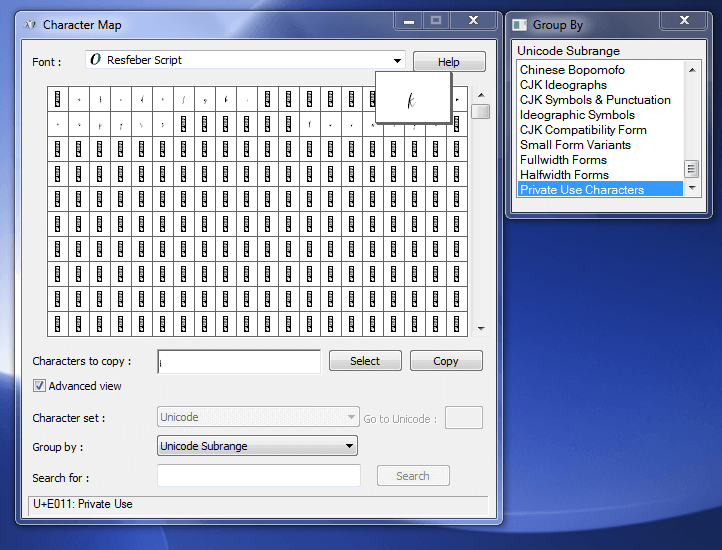
Autumn Love is a pretty robust font – the download includes your standard upper and lowercase characters, as well as numbers, punctuation, and Western European Language Support. It’s also PUA-encoded. PUA stands for “private use area” and is essentially a fancy way of saying that each & every character – even the special ones – have a code attached to them which makes them easy to find whenever you use Character Map or FontBook, and access the extra features.

Those extra features, though, are where the fun begins! There are 132 alternate characters in this font, comprised of left and right swirly swashes, left and right heart swashes, heart connectors, and cute little heart icons dotting the lowercase i and j characters. I’ve also included some heart symbols as doodle elements. It also includes 11 ligatures – ligatures are combinations of letters that are automatically programmed together to look best. Take for example a word that has a double t in it – instead of two separate t characters that appear to have overlapping crossbars, the tt ligature shows up as one single character with a single crossbar for both! It’s up to the artist & their own personal style to include extra stuff like this!

You can find Autumn Love here, if you want to check it out!

Accessing the Heart Symbols

I highly recommend using Adobe CC software to access the heart symbols. It’s industry standard, as far as professional designers go, so many of you will already have this available to you! Adobe CC software makes it super easy – it’s really as simple as highlighting an individual character, viewing the options available, and selecting the option that fits best for you!

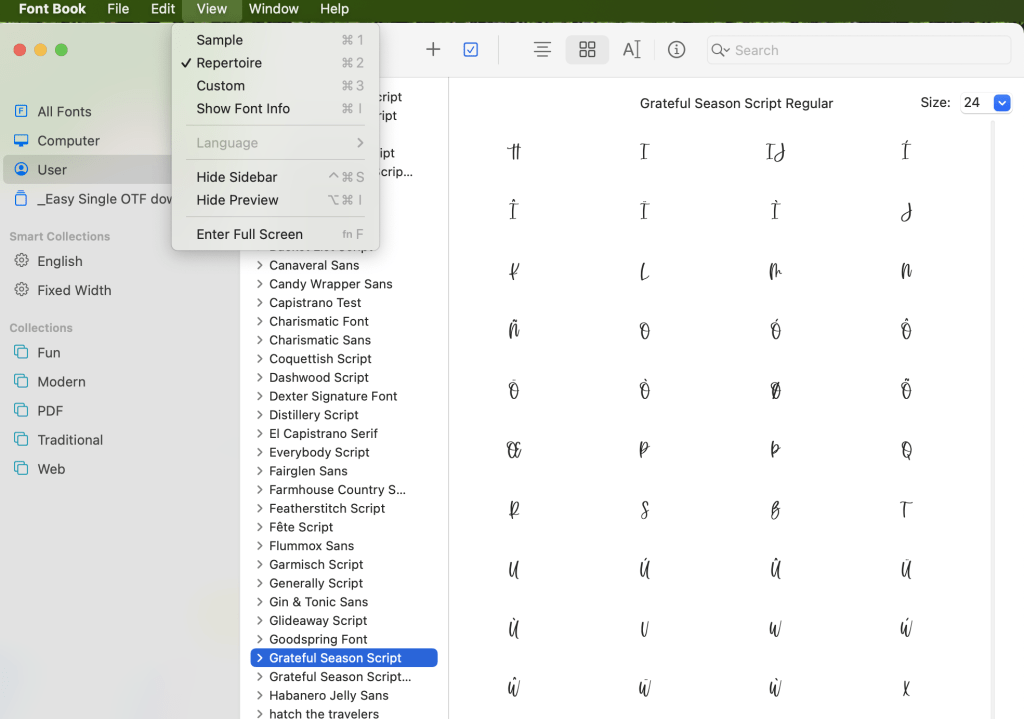
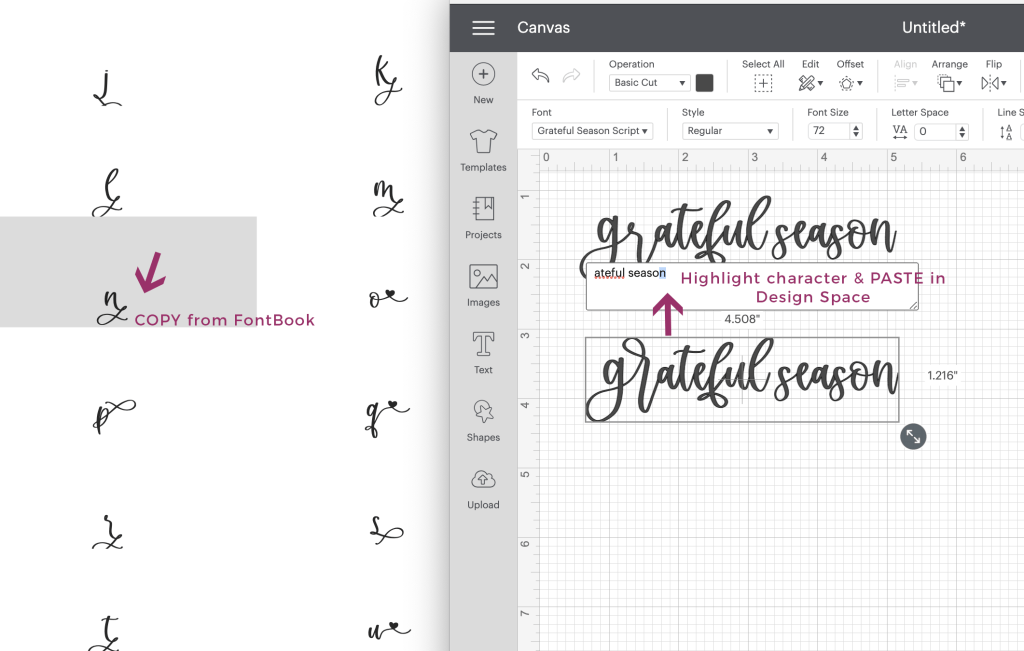
If you don’t have Illustrator or Photoshop available to you, or you’re running an older version than CC, there are other ways to get to those special characters! I mentioned Character Map (PC) and FontBook (Mac) before — and that’s exactly how you’ll get to those extra characters. You can reference my blog post on accessing OpenType features for a full explanation. In short, though, you’ll be able to search & sort through all characters included, make your selection, and then copy paste into the program you’re working in! This is applicable to basic programs such as Microsoft Word, or the Mac app Pages, or any program that you might be using on your computer. This is also how you’ll take your design from just ok and cute to absolutely wow in Cricut’s Design Space. (It’s unfortunate that Design Space doesn’t fully support OpenType features just yet, but hopefully, the developers will make this a feature soon!)

I mentioned that I’ve included some doodle heart symbols, as well. If you’re working in a program that supports OpenType features — meaning, Adobe CC products or other comparable software — you’ll be able to access these symbols easily!

With your ligatures turned on, you can type a few specific symbols, like @@ or $$$. Those characters will automatically be replaced with the heart doodles! I opted to program it this way out of convenience, because sometimes hunting down a symbol is a little tedious. (You can also search for these symbols in Character Map or FontBook, as well, and copy paste them into your chosen program.)

One thing that I love about these doodles is that they fit perfectly with the aesthetic of the font. Because they’re handdrawn, they have a more soft, handmade look & feel than you might find if you were to use something like a heart emoji or a heart icon in a mouse-made symbols font or icon set. There are solid and open versions for each one, as well! Don’t you just love that?!

heart font extra features

What Would You Use a Heart Font For?

Social Media

I personally think that there are limitless uses for a font like this, which is why I put together so many image examples when I listed this beauty for sale! Quote graphics on your Facebook page, Instagram or other social media accounts would be a great fit. Using it on ads or ad items would also be a great use – it’s very eye-catching, and the heart details give it a little extra something that your audience will appreciate!

Invitations + Menu Use

I also love the idea of using this font for a wedding invitation or a save the date – it already has heart text symbols in it, which makes it absolutely perfect for things that are love-related. If you’re the kinda gal who considers emoji use in these kinds of items, this style of font is definitely worth a look as your plans being to take shape.

Autumn Love would make a great choice to use on a food menu, too! How many times have you sat down to read a restaurant’s menu & it’s just the same, boring font that everyone uses everywhere? If you put your menu together with this font, it’s sure to be a conversational topic, too, which is always a good idea for meals.

T-Shirts + Craft Projects

This style also works well on a shirt design – Autumn Love does come perfectly paired with a sans, so it takes the guesswork out of choosing a second font to work with. Speaking of shirt designs, I’ve seen this font used quite a bit in the crafting world. It cuts really well on a Cricut machine – I even used it myself whenever I was making labels for my kitchen containers. (Insert a pic here of these)

Logos and branding are a given – I can’t help but try each of my fonts out in a logo mock-up because of where I started my design journey. If I’m happy with the result in a logo, I always think that my customers will be, as well!

Because Autumn Love is also quite legible, even at a smaller size, it would be great for websites, too, or even WordPress theme creation – it would look fantastic on header elements.

heart font shirt design

Check Out My Website For Even More Fonts

Whether you’re in the market for a single font, or a collection of awesome fonts, I’ve got you covered! Search through my shop to find the perfect fit for your next project – you can even test it before you purchase it!

Or, if you know you want a really fantastic deal – over 200 fonts in a single bundle – you can hop right over, and check out my Handlettered Font Bundle!

How to Use a Heart Font In Your Next Design Read More ยป

Handwritten Fonts

Handwritten fonts have been growing in popularity over the last few years, which is fantastic for me because that’s what I design! I’ve noticed on some design resource marketplaces that handwriting fonts are now even getting their own special search category.

What exactly makes a font “handwritten” though? A handwritten font is any font that was created by your own hand – pen to paper, Apple Pencil to iPad, calligraphy pen, marker, you name it. There are so many (gorgeous) fonts that are mouse-made — created totally on the computer by dropping anchor points and forming the letter — but handwriting fonts possess very special qualities because of the love and care that comes from drawing each & every part with your own hand.

Handwritten doesn’t necessarily mean handwriting, though – if you take a look at the variety of handwritten fonts available to designers, you’ll find that a lot of them don’t even really look like our idea of handwriting at all, and that a lot of craftsmanship goes in to creating these fonts.

I’ve mentioned before that my own handwriting is total crap, and I still stand by that. I typically explain to people that handlettering is a lot like drawing — I mean, it basically is, but instead of drawing a landscape or a comic or an animal, I draw a letter!

Handwritten fonts can make all the difference!

Lemonlove Script Font

Why You Might Need Handwriting Fonts

I am 100% biased, but I think there are so many reasons why any designer needs handwriting fonts. My top reason, though? It makes design fast and easy, and alleviates the need to learn handlettering by designers.

Don’t get me wrong – I think it’s a fantastic, and often relaxing, skill to learn and being able to whip out some handwriting goodness for your client is awesome. But, if you’re on a tight timeline that wouldn’t allow for hours & weeks of practice…or you simply don’t have the inclination to learn & develop those skills…handwriting fonts are where it’s at!

The phrase, “Work smarter, not harder.” comes to mind. Handwriting fonts make it easy to focus on other very important details of any given project, especially when you know, understand, and appreciate the level of craftsmanship that goes into creating a handwriting font!

Handwritten fonts can be used for many applications – logo design, invitations, advertising, even using handwritten fonts on products or packaging. There are handwriting fonts for any occasion, seriously.

Handwritten fonts span a variety of styles – in this category of “handwritten” you might find a sans serif font, a script font, a display font … if the original letter set were created by your hand using some type of writing instrument, it’s a handwritten font.

I do all of my lettering digitally. My trusty iPad and Apple Pencil have helped me to produce over 140 fonts (and another 50+ on the way to being released as I’m writing this). I use the Procreate app, which I think is super cool because you can choose from a variety of brushes to use for your lettering. I typically use a calligraphy brush, but I love using marker brushes and pen brushes, too, because it enables me to produce a font with a slightly different style.

Let me show you a few of my handwritten fonts, because the variety you can get with hand lettering is truly astounding!

A Few of My Favorite Handwritten Fonts

Brioche Family – A Serif Font

Brioche is a handlettered serif font that comes in four variations – regular, bold, italic, and outline. I think you get more bang for your buck when you purchase a font family like this. The bold weight is my favorite of the four!

Brioche has a bit of a textured edge, giving it a rustic farmhouse chic look. Because Brioche is very legible, it would make a fantastic fit for headers or even body text – even at a small size, it’s still quite easy to read. It has a slightly vintage aesthetic to it, but the handwritten nature of the font gives it such a nice personality. One of my favorite things about Brioche are the uppercase A, J, K, and R that have “legs” that drop below the baseline, adding a bit of play and interaction within the word.

Font families like Brioche are very valuable to designers that need more than one option, but also need them to look totally cohesive and like they belong together.

Insider tip: if you’re looking for a font that has an even more rustic style, check out Spring Market, which is by far the most popular typeface I’ve ever designed!

Azusa Trio – A Funky Sans Trio

Azusa is another font that has a few variations – regular, italic, and outline! In contrast to Brioche, Azusa is much more whimsical, and is an all caps font. Azusa could be used for headlines or creating quote graphics for social media. It’s a bit bubbly and feminine in nature. As far as legibility goes, it is definitely easy to read so keep this one on your list of legible, eye-catching, playful fonts!

Fall Ember – A Calligraphy Script Font

Fall Ember would be considered a casual calligraphy font. It’s the perfect mix of flowy handwriting paired with the elegance of calligraphy. This handwritten font is one of my favorites to use in feminine designs and wedding invitations. This style of calligraphy is modern, and would make a fantastic fit for a bride who wanted something beautiful and effortless. My favorite things about this font are the ligatures – check out the title image and the name “fall ember.” Look at the ll, em, and er ligatures — notice how they connect a little differently, giving the font a truly handwritten feel based on the slight differences in how the letters were written!

Saison – A Signature Script

Saison is a personal favorite of mine. I love its spontaneity, messiness, and all of the imperfections. Saison was a labor of love for me, because I created it and modeled it after my own logo that I handlettered. Over time, I received so many requests from designers asking what font I’d used — I always had to tell them that it wasn’t a font, it was hand lettering, and that I didn’t have a super close match in mind.

I don’t have to worry about that anymore, because out of my own logo, Saison was born. Saison would be considered a signature font or handwriting font, because it mimics the way a person might sign their name or hurriedly scrawl a note down. Legibility isn’t necessarily a strong point for Saison, which is intentional, but it does evoke a very modern, contemporary feel. Saison boasts 118 alternate characters and 78 ligatures, so that the user can make modifications to the text to enhance the handwritten vibe.

Branding projects are a perfect fit for Saison, especially for those individuals who want their logo to look like they’ve signed their own name. Check out the example below – I’ve included my own logo, as well, so you can compare!

Dear Journal – The Must-Have of Calligraphy Fonts

Dear Journal is another calligraphy font beast! There are so many extras!! Feature-rich fonts are my thing, y’all. I feel like if you’re going to design and letter handwritten fonts, you should always make them actually look like they’re handwritten instead of striving for totally perfect lines and corners. That’s not to say that you can’t or shouldn’t refine them…but there should be no mistaking that what you’ve produced is actually handwriting. Handwriting is imperfect, and there are always slight variations and inconsistencies, and being able to offer that option is something that will never get old for me.

In contrast with the effortless, flowy Fall Ember, Dear Journal is chunkier and bouncier – it is a bounce calligraphy font! “Bounce” means that the characters do not stay on the same line. They vary a bit, making the letters look like they’re dancing around. The standard lowercase set is the “median” version of the lowercase letters. They’re not too tall, and not too short. The first stylistic set is super bouncy with exaggerated ascenders and descenders, and big loopy flourishes. The second stylistic set is much more subdued. These letter sets can be mixed and matched according to how you’d like your project to look. I’ve included an example of what I mean below – look at how much the words change simply based on your letter selection!

As far as calligraphy fonts go, this one is my go-to when people ask what font I use in my SVG files. Insider info – I don’t actually use fonts, those are all handlettered, too. BUT, I designed and lettered Dear Journal so that I could point people to an option that would be the closest stand-in possible. I think that this is the font to use for crafters and creators — I say as much on the main image, anyway. This font makes it so easy for someone to produce products that have a handwritten look & feel, provide enough variation, and make it look like the real thing. I mean, I guess technically it is the real thing since it is handlettered, after all!

PS, your secret is safe with me. I won’t tell anyone that you didn’t do it yourself. ๐Ÿ˜‰

Get Access to 140+ Handlettered Fonts through my Website

If my case wasn’t strong enough already, I have the best deal around for handwriting fonts. A few years ago when I started producing fonts more prolifically, I decided to bundle them all up together. As a logo & branding designer, I thought about what I, personally, would want in a bundle. The answer was…well, all the things, really. I want all of the fonts I could possibly get, and I would want to feel like I’m getting a tremendous value.

Enter my Handlettered Font Bundle.

Y’all, I truly love what I do, and nothing makes me happier than seeing my fonts in the wild, getting used for a variety of things. It’s so rewarding, and exciting, and I feel like this is one thing I can do to “take care” of the customers who have trusted my creative work and continue to inspire me to produce handwriting fonts.

Ultimately, you’re getting what will eventually amount to hundreds of fonts worth thousands of dollars — it really is a fantastic deal, and I’m so excited for you to take advantage of it. If you’re on board with adding over 140 handwritten fonts to your font collection, click that button below and get started. You won’t regret it!

If you have any questions, please feel free to drop me an email or a contact form. I want you to feel totally comfortable with your investment!

Handwritten Fonts Read More ยป

Scroll to Top

Hi, I'm Beck!

Receive exclusive offers & freebies when you sign up for my mailing list!