
What Makes a Font Good for Cricut?
If you use a Cricut machine, you’ve probably noticed that some fonts cut beautifully while others make you wonder why you ever decided to choose that font in the first place. I’ll say it straight up: some fonts are not good for cutting projects with your Cricut! Just because you can technically install the font and use it in Design Space doesn’t mean you should. Cricut has fonts available for your use, both paid and free, which is fantastic because Cricut has already vetted those fonts for you. But sometimes, you have a very specific idea and you need an even more specific font for a special project, so maybe it’s time for you to learn what makes a font good for Cricut so that you don’t wind up frustrated with bad cuts or feeling like you’ve wasted money and materials!
What makes a font Cricut-friendly?
A good Cricut font should have clean, smooth edges that translate well when cut from materials like vinyl, cardstock, or HTV. Tiny bumps, awkward curves, overly complicated details, and extremely thin lines can all create problems. Brush fonts? Mostly no. Textured fonts with lots of sharp edges and cut-outs? Nope!! Can you cut vinyl with those fonts? Technically yes. Is it going to be a good cut? Almost always no. You’ll wind up with vinyl that’s torn and lifted up because your blade is gonna be working overtime for a cut like that!
So honestly, the best way to ensure that a font is Cricut-friendly is to make sure that it has a smooth appearance and that it doesn’t have much texture to it. A font may look gorgeous on your screen, but if the letters contain lots of tiny details or fragile connections, those details can become difficult to weed or even disappear completely when cut.
Smooth edges are one of the biggest things I look for when creating fonts specifically suited to crafting. The goal is a font that looks good on your screen and behaves nicely when your Cricut starts doing its thing.
(Oh, and let me just put this disclaimer here – if you’re cutting something large, you might be able to get away with a good-looking cut with a textured font…but small sizes? Skip that, girl. Don’t do it.)
Thin fonts aren't always better, even if they are smooth.
Super thin lettering can be beautiful for invitations, digital designs, and other applications where you’re working with a screen or printer. Cutting those same delicate lines from vinyl is a different story.
The thinner the details become, the more fragile they can be. This doesn’t mean you need to avoid delicate fonts altogether, but it’s worth considering the material you’re cutting and the size of your finished project.
For everyday Cricut projects, fonts with a little more substance tend to be much easier to work with. That said, if you have extra material and the inclination to test it out, go for it! Exploring limitations will only help you make future decisions as far as which fonts work for your crafty needs.
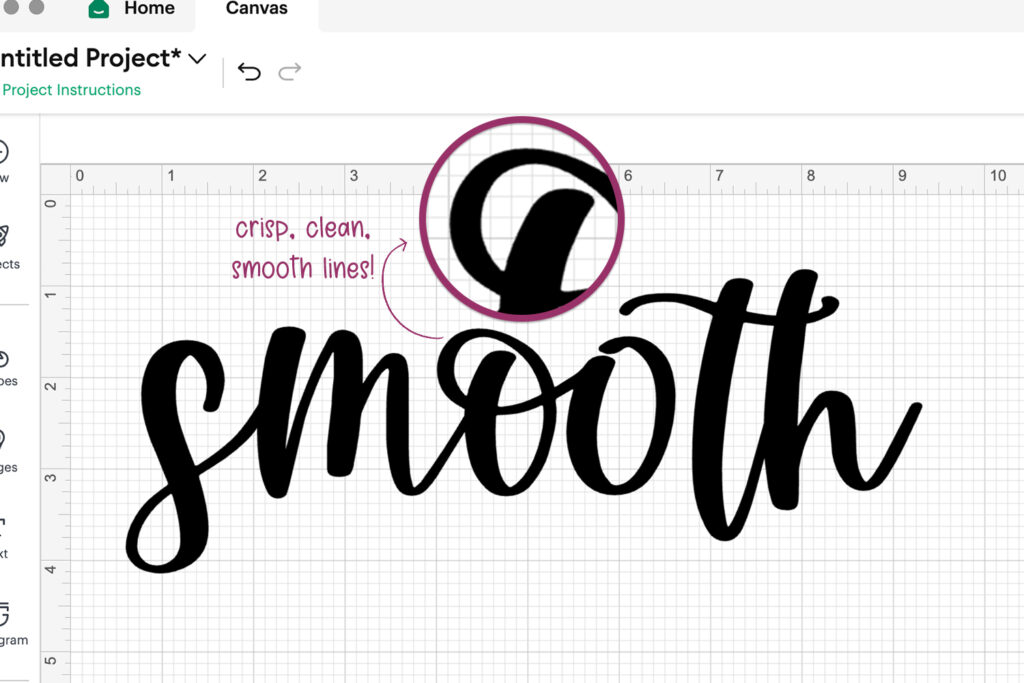
Smooth, clean font for Design Space | Autumn Love Script
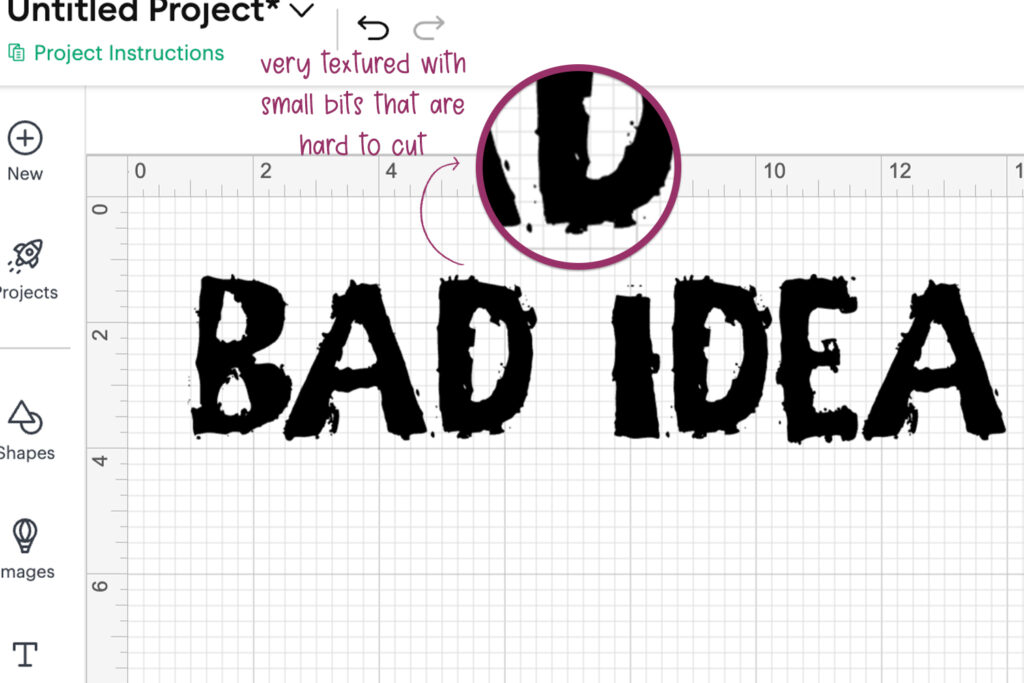
Textured, ragged font – not good for Design Space | Unearthed Grungy Font
The material matters, too.
Even a very Cricut-friendly font can behave differently depending on what you’re cutting.
A design that works beautifully on permanent vinyl may be more difficult to cut from cardstock, and tiny lettering that works at six inches wide may be frustrating at two inches wide.
Before committing to a large scale project, it’s always a good idea to test your font and design at the size you actually plan to use.
What about fonts that aren't labeled Cricut fonts?
Remember just a few paragraphs back when I said that technically any font can be used in Design Space? Not all fonts carry the “Cricut font” descriptor. In fact, most font designers don’t create their fonts with Cricut users in mind like I do, but the font may be perfectly amazing to use in Design Space because it meets the smooth edge requirement and cuts well at varied sizes.
Labeling a font as a Cricut font is an important distinction, in my opinion, because it makes your crafting decisions a little easier. That’s why I make sure that fonts that are a good fit get that label! It’s been tested and vetted as a good fit, so you don’t need to worry about it. Check the link below to see the fonts I’ve labeled as Cricut-appropriate, so you can get a good idea!
A good font should make your project easier!
And, just so you know: you should treat fonts that you install for Silhouette Studio the same way! Clean, smooth edges for cutting are best for any vinyl cutting you’ve got going on.