Beck

Need A Font That Looks Like Handwriting?

Handwriting fonts always add a personal touch to projects. But finding one that you like can be a challenge. A handwriting font can be anything from a script font to a hand-drawn brush font, but can also feature sans-serif or serif fonts! The style of a handwriting font is created to emulate a different handwriting style each time!

Handwriting fonts are similar to script fonts but have a less “polished” look to them. They tend to be a bit more rustic and organic in their design, giving a more unique and personalized feeling to them.

What Are Handwriting Fonts Good For?

Handwriting fonts come in many different styles and can be used for almost anything. If you’re looking for a handwritten font to use on any project, I’ve got you covered with my directory of over 200 handwritten fonts. Handwriting fonts aren’t just for projects that involve hand-written text. You can use them on any project that you’d like to add a personal touch to, such as:

  • Photos – People love handwritten fonts for scrapbooking and photo albums! 
  • Watermarks – Handwriting fonts also make great font-based watermarks for images that are produced by photographers, images that are placed on blog posts, or for product images.
  • Logos – You can use a handwritten font to give your logo or brand a personalized feel.
  • Invitations – Handwriting fonts are great for making your own party or wedding invitations or greeting cards.
  • Cards – Nowadays it’s not often we get hand-written letters in the mail… but when we do, they stand out because of the handwriting font used.
  • Gift Tags – You can make handmade gift tags with them, or buy pre-made ones featuring your design online at sites like Etsy.
  • DIY Projects – You can use any one of these fonts for any of your own DIY projects.

You can do many more things with handwriting fonts besides making cards and scrapbooking layouts! Browse the internet to find what you’d like to create, then try out some of the beautiful handwriting fonts in my shop for personal or commercial use. Don’t settle for free handwriting fonts that get the job half done, find your new favorite handwriting font today!

You’re bound to find something that will work on your next DIY project!

Should I use free handwriting fonts or premium handwriting fonts?

Handwriting fonts are very popular in scrapbooking and card making. Because of this, there are many free handwriting fonts available online which you’re able to download for free.

But, that doesn’t always mean that free handwriting fonts are the way to go. Premium handwriting fonts are more often than not created with more attention to detail than even the best free handwriting fonts. This means that, even your favorite free handwriting font, may end up looking more like a font than something that is handwritten, while a premium handwriting font can often emulate the look and feel of handwriting! (Pro tip: I do this by including tons of alternate character options & ligatures in my handwritten signature-style fonts. Ligatures are combinations of letters programmed as a single glyph. You don’t find many free script fonts that offer such a wide range.)

My Favorite Not-So-Neat Handwriting Font

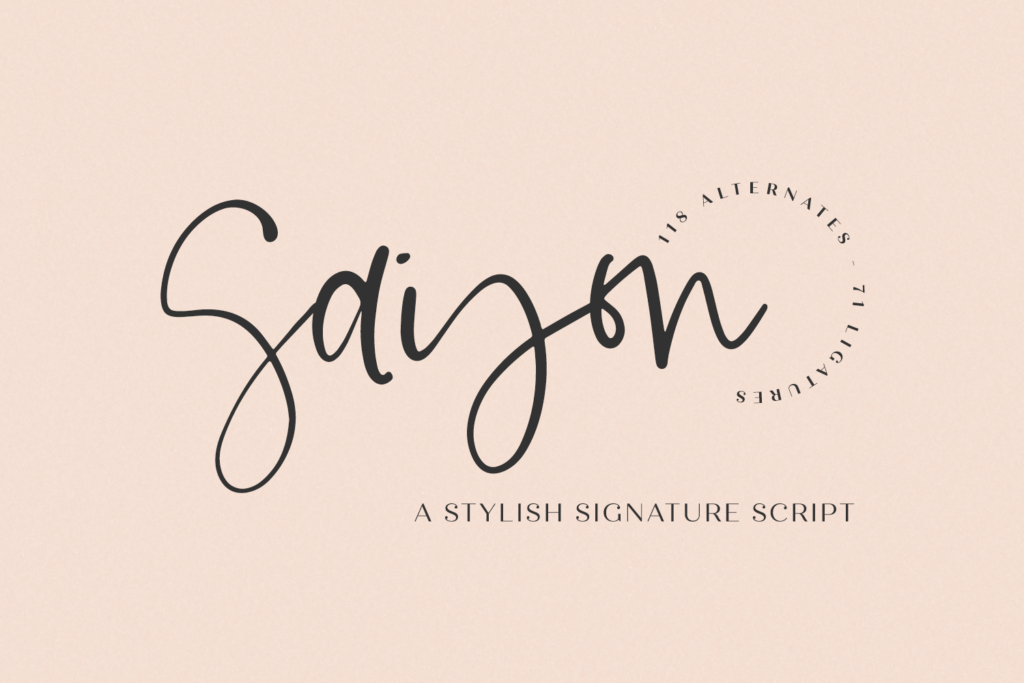
My personal favorite cursive handwriting font is Saison Script, a handwritten signature style font. Saison was inspired by the lettering I used in my own logo — I decided to make this available to my customers, since so many of you have asked the question, “What font did you use?” Now, I can tell you that it’s this one! This stylish script font features a messy, casual look and ligatures to enhance the flow of the handwriting look & feel of your project!

Saison Script is best for:

– logos + branding

– website design + website accents – think travel blogs, fashion blogs, & more

– clean print design, like magazines + flyers

– header elements that need handwritten touch

– quote graphics for social media
Check Out My Other Handwriting Fonts in the Shop!

Need A Font That Looks Like Handwriting? Read More »

Winter Fonts – My Inspiration

For me, the holidays are always the best spent with family.

A couple years ago, we celebrated the fall and winter season by heading out to Austria and Germany around Thanksgiving! I love to travel, so it was amazing to get this opportunity to do so, all while experiencing how another country begins to celebrate the Christmas season.

It was hard at first, since we were all tired AND they speak a completely different language than we do. Speaking English in Germany made me feel a little silly, but the locals were quite forgiving. Knowing the very basics was helpful – thank you, and I’m sorry/excuse me.

Strolling around the Christmas markets was definitely the highlight of everyone’s experience in Germany, though. It was nothing short of pure magic for me, and that’s definitely not just the Gluhwein talking. Tooling through the booths really sparked my inspiration!

Everywhere, you could see different things at each booth, like cookies at one, and a collection of paintings done right in front of you. You could find just about anything there. Also, their food and sweets selection was immaculate. Each candy booth had hundreds of types of candy, and some sweets booths even had chocolate covered strawberries, made fresh. I got to experience raclette for the first time, too!

Thankfully, we went at just the right time of year where there was a bit of chill in the air, but no real ice or snow to speak of. To be fair, I wouldn’t have minded a little snow, but the ice…no thank you.

Anyway, inspiration was everywhere I looked. I love the holiday season, so I’ve put together this collection of winter fonts for you, which will be the perfect addition to winter themed designs and projects.

Not Your Average Font File

This bundle is amazing for the winter season, and it has so many script fonts to choose from. Winter fonts might just seem like a ruse, like… how can a font imitate or work well in the winter? That’s the thing: winter fonts bring the feeling of winter (cozy blankets, hot chocolate, opening presents) right into whatever projects or designs you’re making.

The font files are easy to use and download, so it’s very user friendly as well! The complete font list for the bundle can be seen on my site, but here, I’m going to talk about some of my favorite fonts, favorite font style, ideas, (which I have thousands of!) The image below provides some insight into what my Winter Bundle looks like. These images show that each font included in this bundle has its own personality! The fonts included in the bundle are mainly script fonts, but there are also fonts that mimic handwriting, and are perfect for any designs or projects you may have this Christmas season.

With the theme of the bundle obviously being winter, it’s no surprise that the branding and names of the fonts follow suit. It doesn’t matter what projects you’re making, or how you’re using the font files you’ve downloaded, it’s based on the quality of the font, and these fonts are top tier if I do say so myself. If you take a look at my fonts list, there’s sure to be something there for all designers that are into lettering, handwriting, Christmas, or anything, really!

What Exactly Can I Do With The Font Files?

Once you’ve download your font files, you can do so many things with them! I always see page upon page upon page of awesome Cricut cutting machine projects on the web, so it’s really up to doing what you want to do with the font files.

Google is a great way to help you find just the right ideas that work for your letters and font files, as well.

Using your Cricut machine, you can cut a sticker, vinyl, or infusible ink, just be sure to visit a few websites beforehand to be sure you’ve got the right setup. I’m notoriously a crappy crafter, so I review instructions each & every time so that I’m not being wasteful with materials.

Using the Cricut official site, they can help guide you on the right path, and even give directions for basic projects. Using the font files for personal use, like Christmas gifts or even a decorative plate for cookies is always a really good way to show off your Cricut skills, and how well you can cut using the machine. Your project will turn out nothing but stellar, I assure you!

I think these Christmas-themed fonts & projects are a great way to get into the Christmas spirit. Also, Gluhwein is a great way to do that, too.

Visit My Website To Get This Awesome Deal

The winter font bundle is an investment in your design arsenal! The bundle includes a collection of script fonts, fonts that mimic handwriting, and many more, so it’s guaranteed that your perfect font file is in there waiting for you!

The Christmas spirit is brought to life by my bundle, and is sure to be perfect for you designers and you crafters alike. Lettering is a great hobby of mine and also what I get paid to do (I LOVE THAT), and I love being able to share it with other designers like you.

Just as a reminder, I include a personal use and commercial use license with your purchase, so you’re welcome to use this font collection for your own projects, as well as for your business!

Sign Up For Free Fonts

If you want to give my fonts a bit of a quality test drive, you can always sign up for my mailing list on my website! I send out some freebie fonts after you sign up, I’m sure you’re going to love them!

Winter Fonts – My Inspiration Read More »

Upload Custom Fonts to Canva

Upload Custom Fonts to Canva

Let’s talk about Canva!

I don’t use Canva much…or at all…because I’m a total Adobe girl. (It’s basically necessary for me to create my fonts & SVG designs.) But if I wasn’t a designer, I’d totally be using Canva.

In short, Canva is a browser-based graphic design program that makes it easy for users to create their own designs. Canva comes stocked with various items — fonts, graphics, stock images — and it also allows you to upload your own items, as well, to create your designs!


One question that I get frequently is whether or not a Canva user can upload their own fonts.

The short answer is yes!

There are a few caveats, though. This feature is not available for free Canva account users. It is, however, available to Canva Pro, Canva for Enterprise, Canva for Education, and Canva for Nonprofit users. A user can also upload only up to 100 fonts. (If you’ve maxed that out, which is easy to do, you can remove some of your uploaded fonts to make a swap.)

Canva: Upload Font How-To

I created a video to show you how to upload a custom font to Canva! If you aren’t certain about whether or not a pro account is right for you, you can sign up for a free trial, which is what I did here in order to show you how to upload a font!

Here’s a breakdown of the instructions for a Canva Pro account:

  1. After you log in to your Canva account, click “Brand Kit” from the panel off to the side.
  2. Click “Upload a Font” which is found under the Brand Fonts section. You’re able to use multiple font file types: .otf, .ttf, or .woff formats are accepted!
  3. Navigate to the font you wish to upload, and click “Open.” You’ll be prompted to confirm that you’re licensed to use the font in this manner. (If you purchase my fonts, you’re allowed to upload the fonts to your Canva Pro account for your use only, whether personal use or commercial use!)
  4. Click upload after confirming!
  5. You’ll receive a message that lets you know if the upload was successful or not.
  6. That’s it! It’s so easy to upload fonts to Canva!

How to Access Your Uploaded Fonts

You’ll be able to find your uploaded fonts whenever you access the dropdown menu where the fonts are located. All custom fonts are found at the very top of the list, under the Uploaded Fonts section! I think it’s really nice and helpful that the uploaded fonts are separated from Canva’s font library.

Once you select one of the custom fonts, you’ll be able to type in it and create an awesome design!

Get Insane Amounts of Fonts

Check out my Handlettered Font Bundle!

You can definitely use these beauties in Canva to make your design that much more customized – premium fonts are great for giving your design that extra edge…not a knock against Google fonts or anything like that! There just aren’t a ton of handlettered fonts included in Canva’s font library.

This particular bundle is awesome because it includes so many fonts – more than 160 as of August 2021.

Don’t worry about licensing, either – it includes personal and commercial use, so you can sell the crafts you make using these fonts!

Upload Custom Fonts to Canva Read More »

The Fall Font Bundle

So many things come to mind when you think of fall, like apple cider, apple butter, maybe a pumpkin patch, crisp autumn leaves, or a special fall occasion. Fall is my favorite season of all, and ironically, I’ve only ever lived in places that don’t get much in the way of foliage or cooler temps – hello Florida & Southern California! That doesn’t stop me from lighting my cinnamon candles in August, though, wishful thinking that maybe, just maybe, there will be a nip in the air.

While we’re on the topic, my love for the season has given rise to a few fall-themed (or named) fonts! The Fall Font Bundle has the perfect fonts for your every mood, project, and products like home decor, DIY decorations, party invitations, shirts, anything you could think of.

If you’re looking for my bundle that includes fonts for fall, you can check it out by clicking the button below! If you’re here checkin’ out what this bundle is all about, read on!

As a graphic designer, I have a collection of fonts (over 7,000!!!!), like holiday fonts, script fonts, calligraphy fonts, anything you could think of, there’s so many ways to use them. (Even free fonts too!)

Most of the fonts that are included in the Fall Font Bundle are script fonts or handwriting fonts, but I’ve also included a super cute sans font, too!

Buying Fonts in a Bundle is a Way Better Value

Before purchasing, you should ask yourself “What am I looking for in a font bundle?”

For me, it’s always variety and value! For starters, you get seven fonts in this bundle, but you’re only paying for about 1.5 fonts. This bundle is valued at $84, but you’re paying only $18.

So, what do you get in this collection of fonts for fall?

As far as variety goes… this bundle might be a bit script font-heavy, but there are a few cute sans fonts which work well with the other fonts included in the bundle! Take Pumpkin Chunk for example – it’s a super cute sans serif font, and it pairs perfectly with Gingersnap Script and Hey Pumpkin Script!

Autumn Love also comes with a sans serif font, already paired perfectly.

Butternut is an adorable handwriting font, and Fall Ember is a beautiful script font that would look lovely on a wedding invitation.

Overall, the fall font collection is perfect for fall crafting projects, too! Each font features a smooth edge, making it an easy option for your Cricut or Silhouette cutting machine. These fall fonts are sure to make your design projects look a bit more special for the fall season.

As a heads up, making this bundle an even cooler value, I include commercial use licensing as a standard. That means that you can use the fonts for a personal project, or you can use them for your commercial projects or business offerings!

Let me tell you a bit about each font in the Fall Fonts Bundle!
Autumn Love is a font duo, and this script font is packed with excellent features. It’s probably one of my favorite fall fonts that I’ve ever created, because I adore the heart details included on the letters. As you can see, you can add hearts as a part of the swash options, between words, or even dotting your i!
Butternut Script is a monoline handwriting font. It reminds me a bit of writing with a gel pen, with a consistent size throughout. The letters are bouncy and flowy, I love that you could use this font for things like shirt designs or logos.
Gingersnap is playful script font. It’s also bouncy like Butternut, but features more of a messy signature style vibe.

Pumpkin Chunk is a sans font, and is all-caps. It makes quite the bold statement, making it easy to read from afar. It would look great on a shirt!

Septiembre is a modern calligraphy font featuring loopy flowing letters. It has a very casual feel.
Fall Ember is also a modern calligraphy font, but it is much thinner and leans a bit more to the right. Fall Ember is refined, but still maintains an effortless handwriting feel. There are plenty of alternates included in this font, so you can swap letters at will to give your project a bit more of a handwritten, unique look!

Hey Pumpkin is a simple monoline script, and I love this font for shirts and crafting! I also think that it’s perfect for making graphics for social media – these quotes are super cute!

How Can I Use These Fonts?

I’ve already mentioned a few possible uses above, but I think this font collection is so versatile!

We’ve already touched on craft projects – most of those will make use of a Cricut machine or something similar so that you can make a t shirt, coffee mugs, signs, cupcake toppers, greeting cards, and so much more! All of these things can be made for you personally, gifted to a friend (perfect for the holidays!), or you can sell it because I include commercial use with my fonts!

Another great use would be on your website (or a client’s website). I love to see my fonts used as accents on a website, or used as a heading element on blog posts or web pages. Even though this collection of fonts has a fall theme, your website doesn’t necessarily need to be fall-themed to make great use of the fonts!

Wedding invitations was something I mentioned above, specifically with the Fall Ember font, but any of the script fonts would be a good fit – it simply depends on what aesthetic you hope your wedding invitation will have! Are you hoping for something casual but fun? Hey Pumpkin would be great for that! If you’re looking for something a little more romantic but easy to read, Autumn Love would be a great fit – I mean, it already has cute little decorative heart details, which definitely fits the wedding theme!

The Best Font Bundle on My Website

If you’re a total sucker for font bundles like I am, don’t limit yourself to my Fall Font Bundle! All of these fall fonts, plus over 200 more, are available with my Handlettered Font Bundle.

It’s truly a special bundle because the value is out of this world, and the variety is insane! (Remember, I told you that I looked for value and variety…this is it, y’all, if you’re in business and needing a great deal to overhaul your font list.)

This is one of those collections that will entirely change how you design, and will probably give you a bunch of new ideas for products, projects, and combinations.

The Fall Font Bundle Read More »

Use a Cursive Font for Cricut Designs

Script fonts always look amazing on a screen, and even better in print or in designs. I’m a font designer, so I realize that I might be a little picky and critical about font choice for any given design project. That said…the default fonts in Cricut Design Space aren’t really all that cool. (No shade at the original designers, because I know how much work goes into creating the fonts! All I’m saying is … there are WAY more choices than the defaults!)

Using a script font while crafting may also prove to be challenging at first because there are so many choices to choose from, but this post is filled with tons of information to get you started! Working with mugs, canvas, stationery, and many more craft projects will be as easy as pie!

Script Fonts in Cricut Design Space

When getting used to using script fonts in Cricut Design Space, it’s impossible to choose just one font that has all of the script letters exactly the way you want them. Cricut Design Space does this really weird thing where the letter spacing is always, always off. Meaning, it treats the font completely differently than the designer intended it to, and for those fancy script fonts where it’s supposed to look like continuous cursive writing…it just looks like spaced out cursive letters. Womp womp. It’s terrible, and I don’t know why Design Space does this, but it’s fixable!

(I have a blog post about this, but here’s the run down: use the letter spacing tool and bring it as close together as possible. Sometimes, it’s actually negative, and not just 0. This will give you a pretty good indication of whether or not it’s a font that you want to use. If you do, choose the “ungroup to letters” option up at the top of the layers panel. This releases each letter to its own layer, and you can piece them together yourself. Make sure to weld the letters to each other before cutting them!)

Anyway, my Handlettered Font Bundle has over 200 hand-lettered fonts to chose from. With this many amazing fonts in one package, it’s hard to go wrong! You may be thinking, “200+ fonts? That’s too many! How will I ever find the one that fits well with the project I’ve envisioned?” Don’t worry! The bundle is easy to navigate, and all fonts included are shown in photos, along with its very own branding. (I’m convinced each font has its own personality.) This way, it is easier for people to scroll through the fonts included, and see how they look visually before crafting with them!

What projects would use script fonts?

Using script fonts for projects always gives the craft the extra edge; it puts it over the top, and it always looks way more polished. I’ve done many Cricut machine projects, but there are some that are super popular within the Cricut and crafting communities. Within Design Space, you can create some amazing works of art, like customized mugs, t-shirts, and farmhouse signs. If you have access to professional design programs like Adobe Illustrator, you can also use the fonts for logos, branding, product packaging, and other branded materials.

The font collection is very versatile, and contains a wide variety of cursive fonts, all handlettered to perfection! The font types range from calligraphy fonts to fonts that mimic handwriting – you know, a little messy and scribbly. In the bundle, you will also find whimsical sans fonts, farmhouse fonts, rustic fonts, signature fonts, and handwritten serif fonts. Crafts are sure to be amazing when you have the perfect font for every occasion! Not to mention, the fonts are also very user-friendly to download and upload to your projects, so it makes it easier to use for all of your crafts!

What’s Included in my Font Bundle

Like I mentioned before, the range of fonts included in this bundle is incredible. Each font includes the installable .otf file for your convenience. Personal and commercial use is permitted, so you can use these fonts for your own personal projects, or you can use them to create an item for sale.

Do You Craft With the Cricut? I Try to, Haha!

Using the Cricut has… been a challenge for me. I would constantly find myself trying to find a cheat sheet, or anything that could help me be less Cricut-inept as I was when I first began using it. I’m still a pretty crappy crafter, but I have learned some cool tricks.

Letters and how they came out on my projects was definitely one of the hardest parts. I couldn’t seem to understand why some fonts worked better than others for cutting purposes. It felt like I was confined to using a bolded sans font forever, which didn’t sound appealing for a cute project. And for a font designer? Sort of heart-wrenching. I just wanted to use a dang script font! I wanted my projects to have flair! I wanted the projects to have something to make them stand out from the rest. I knew I wanted more from the Cricut, I just didn’t know where to start — it was easier for me to letter & program a font than learn how to use the Cricut, which sounds crazy, I know!!

The intricate script fonts weren’t weeding well at small sizes, and that was why they looked like complete crap. Using the default Cricut fonts just didn’t sit right with me because I’m a font snob. (Hey, at least I’m honest.) There was definitely a learning curve as far as what worked and what didn’t. I swear, I read article after blog post, and things just didn’t click right away!

When I realized I was able to upload my own fonts to the Cricut, I was so excited to see my fonts in action, I started making crafts right away. I began making mugs, which seemed like the best project, since I drink a TON of coffee. I would type what I wanted the mug to say, then I would place the text within the parameters of the design space that was given.

I clicked the start button, and sat back waiting for something to go terribly wrong. But, no weird noises, no explosions, no fire starting … I mean, I really mean it when I say I’m not a very good crafter, y’all.

I watched intently as the Cricut made its precise cuts on the vinyl. Looking back at my computer, I could see that the progress bar was almost full, so I was preparing myself for the worst even though it looked like it was going well. I was sure the design would come out wrong.

It wound up going ok – and so began massive amounts of experimentation using cursive fonts with my Cricut!

Cricut Fonts

Adding fonts to the Cricut Design Space may seem super tedious just reading about it, but I’m here to give a summary of it. I’ll lay down the basics, and the need-to-know information to help you on your Cricut journey.

Custom Fonts In Cricut?

Yes! You can use custom fonts in Cricut Design Space! Here, I’ll give you the steps on how to get them in the Design Space.

  1. You need to install the font on your computer first.
  2. Look in the System Fonts section of Design Space for your newly installed fonts. (System Fonts are easy to find, and navigate.)
  3. Design to your heart’s content using your cool new non-Cricut default fonts!
A Little More Info: Basic Terminology, and What You Need to Know

Cricut is the machine you’re using. Design Space is the software that is used along with it. You can use custom fonts in Design Space. In fact, you can use any fonts you’ve installed in Design Space! You definitely want to make sure your fonts work with Design Space, first. Since I provide .otf and .ttf files, you’re golden!

You can’t upload fonts directly to Cricut Design Space, though. Don’t worry, your project you’ve gotten ready to create is still safe. The biggest mistake that most Design Space users make as it relates to custom fonts is trying to directly upload the font file to Design Space.

This ends up coming back to me with upset and/or worried customers telling me that my fonts “Don’t work on Cricut,” or that it’s the “Wrong file type.”

The fonts do work, they are the correct file type – you just need a quick tutorial on what you need to do!

Spoiler alert: It’s really simple.

You need to install the font onto your computer FIRST, this step is crucial in working with Design Space. Follow these instructions!

How to Get Your Fonts to Cricut Design Space

Mac Instructions – Here’s a step by step tutorial on how to get your fonts into Cricut Design Space.

Step 1 : Download the font!

You need to access your downloads the way you would any run-of-the-mill download. You’ll need to save the files to your computer. The easiest way? Drag to your desktop. You need to extract the file, and confirm any text box that pops up.

Step 2 : Extract (That means Unzip!) The Font Files

Once the folder is unzipped, it will show all of the previous content I had mentioned. It has many options that are there to make things easier for you, but you only need to install one file. Personally, I would suggest you use the .otf file for installing. Right click or double-click the file to open the menu. Then, select Font Book when it appears from the Open With tab.

Step 3 : Install the Font File

When Font Book pops up with a window for installation, you need to click install. Instead, you can copy and paste the file directly into your computer’s font folder. Command+Shift+C will bring up your computer. Double click your hard drive’s name, then double click the Library folder. Within the Library folder, you’ll see the font folder. Paste the font, and with .otf, it’s already installed.

PC Instructions/Windows Users – Here’s a tutorial on how to get your fonts into the Cricut Design Space.

Step 1 : Download the font!

You need to access your downloads the way you would any other download. You’ll need to save the files to your computer. The easiest way? Drag to your desktop. You need to extract the file, and confirm any text box that pops up. Overall, the process is pretty much the same as it is on a Mac.

Step 2 : Unzip the Font Files

Once the folder is unzipped, it will show all of the previous content I had mentioned. It has many options that are there to make things easier for you, but you only need to install one file. Personally, I would suggest you use the .otf file for installing. Right click or double-click the file to open the drop down options. Then, select Font Book when it appears from the Open With tab.

Step 3 : Install the Font Files

Right click the font file, and select “Install” on the menu. You may also copy/paste into your computer’s font folder. (this is accessed by Start > Control Panel > Appearance and Themes > Fonts, paste them in there!)

Tips and Tricks
  • Restart your program if it doesn’t show up!
  • You HAVE to unzip the file before dragging and dropping it.
  • You can’t install the webfonts on your computer.
 
What are Cricut Fonts?

I keep saying Cricut fonts. What are Cricut fonts? When I say “Cricut fonts”, I mean the default fonts that the Cricut Design Space already has for free, or for a (normally) small fee. Design Space comes with a standard set of free-for-you fonts, and you can purchase other fonts one by one. If you have the Cricut Access subscription, you get access to over 500 fonts within Cricut Design Space.

The difference between custom fonts (like the ones in my bundle) on Cricut Design Space and Cricut fonts is simple: You get to keep the file! The Cricut Access subscription is great and all, but you don’t actually get to have the fonts installed on your computer. Cricut Access is great for beginners, since it has lots of valuable choices. For more long term hobbies and projects, definitely stick with custom cricut script fonts.

So get out there! Find some custom, hand-lettered fonts you LOVE, and start crafting! Don’t be afraid to post your creations to share them with others!

Use a Cursive Font for Cricut Designs Read More »

Scroll to Top

Hi, I'm Beck!

Receive exclusive offers & freebies when you sign up for my mailing list!